You've seen these caption styles a thousand times. The bold words that pop up two at a time. The look with a bright highlight on the key word. The clean, minimal style that feels premium. They're everywhere because they work, they keep people watching.
The problem has always been getting that look on your own video. Building a style like that by hand means splitting every single word into its own text box and timing each one to the audio. For a one-minute video that can eat an hour. And if you're working in a desi language, it's even harder, because these styles were never made with Urdu, Hindi or Punjabi in mind.
Kalakar fixes that. You pick a template, apply it in one click, and it's timed to your audio automatically, in any of 20+ desi languages. This post walks you through the templates, what each one is good for, and how to use them.
The short answer
A template is the fastest way to get a professional caption style. Instead of building the look word by word, you choose a ready-made Kalakar template, apply it, and export. The captions are generated and timed for you, with up to 97% accuracy, and every popular style works in desi languages, not just English.
Why your caption style decides whether people watch
Most people scroll short videos with the sound off. That means your captions aren't a nice extra, they're the hook. If the text on screen is dull or hard to read, people keep scrolling before they hear a word.
A good caption style does three things:
-
Grabs attention in the first second.
-
Keeps eyes moving so people stay on your video.
-
Highlights the words that matter so your message lands even on mute.
That's why the look of your captions is worth getting right. And with a template, getting it right takes seconds instead of an evening.
The Kalakar templates, explained
Here's what each style is good at, so you can pick the one that fits your content.
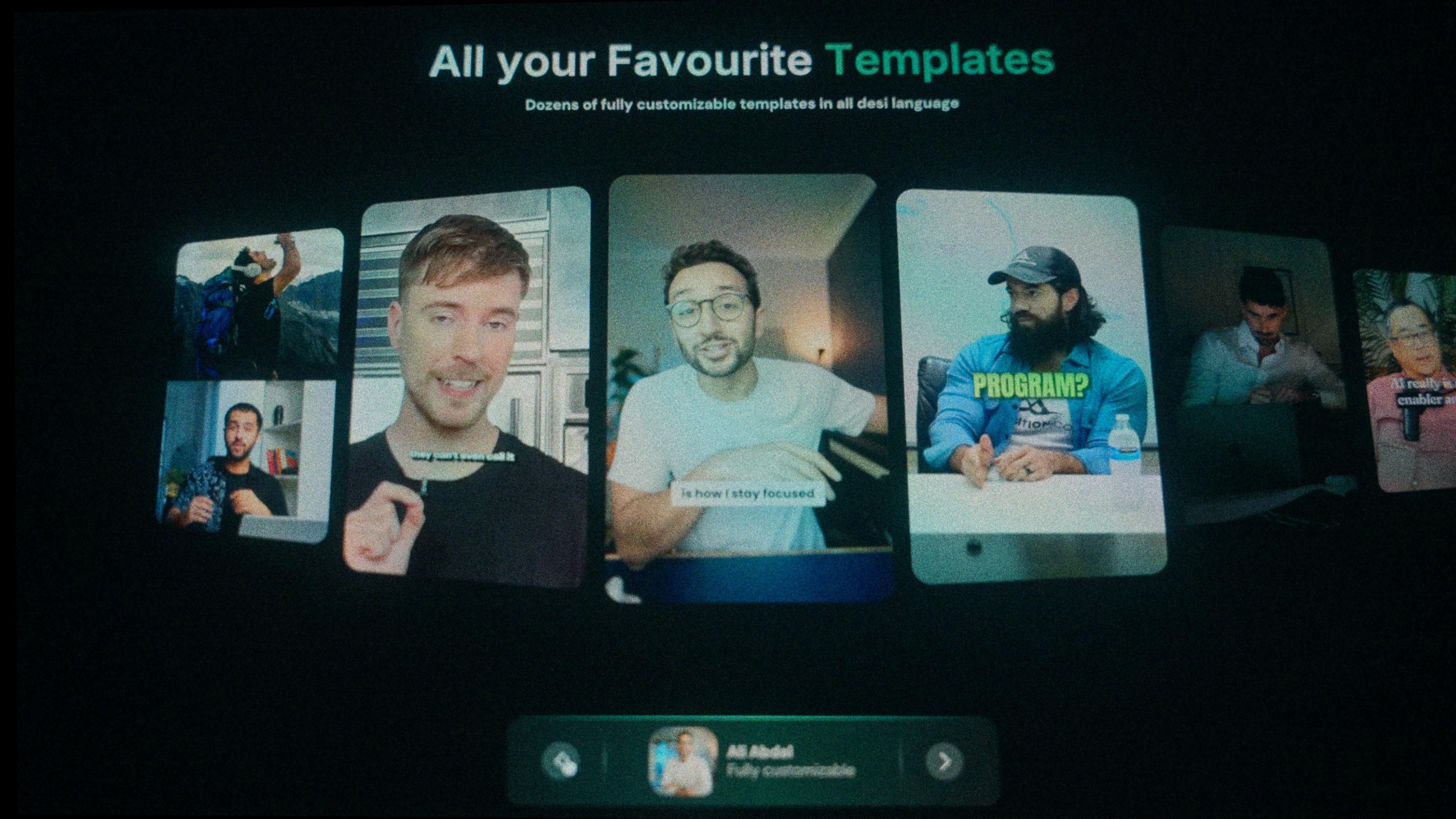
MrBeast style. Bold, chunky text, usually a couple of words at a time, with the odd keyword in a bright colour. Fast and high-energy. Great for entertainment, challenges and anything that needs to feel punchy.
Alex Hormozi style. A heavy, all-caps look with a bright highlight behind the key words. Built to make people read every word. Perfect for business, motivation and value-packed talking-head content.
Iman Gadzhi style. Cleaner and more minimal. Confident text that looks premium without shouting. Suits business, education and lifestyle content.
Ali Abdaal style. Friendly and easy to read, with a calm, informative feel. Ideal for explainers, tutorials and productivity videos.
Bubble style. Rounded, playful captions that suit lighter, fun content and comedy.
Devin Jatho and Editing School styles. More options for creators who want a distinct, editor-friendly look straight out of the box.
Every one of these is fully customisable. You can use it exactly as it is, or make it your own.
How to add a template to your video
Here's the whole process, start to finish:
-
Upload your video. Or just the audio, an MP3 works fine.
-
Pick your language. Choose from 20+ desi languages including Hindi, Urdu, Punjabi, Bengali, Tamil, Telugu, Gujarati, Marathi, Sindhi and Pashto.
-
Choose a template. MrBeast, Alex Hormozi, Iman Gadzhi, Ali Abdaal, Bubble and more. The captions are generated and timed to your audio automatically.
-
Customise it if you want. Swap the colours, change the font, or upload your own font to match your brand. Or leave it as-is and move on.
-
Export. Get a finished video ready to post, or export an SRT or alpha-channel file to finish up in Premiere Pro or DaVinci Resolve.
That's it. The look that used to take an hour now takes a couple of minutes, and it works in your language.
Tips to make any template look its best
-
Keep it to one or two lines. Long captions get cut off on phones and spoil the clean look.
-
Match the style to the content. A comedy reel suits Bubble; a business video suits Iman Gadzhi or Hormozi. Pick the mood that fits.
-
Highlight the word that matters. The power of the Hormozi look is emphasis. Highlight the key word, not every word.
-
Start with clean audio. Templates look great, but accuracy comes from clear sound. Kalakar has built-in audio enhancement that cleans up traffic, crowds and hiss so your captions come out right.
-
Read it once before exporting. Catch any names or mixed Urdu-English phrases that need a quick fix.
Frequently asked questions
How do I get a MrBeast-style caption on my video? Upload your clip to Kalakar, pick the MrBeast template, and it applies the bold, word-by-word style automatically, in English or any of 20+ desi languages.
Can I make these styles in Urdu or Hindi? Yes. Every Kalakar template works across South Asian languages, with correct desi-language text and formatting.
Do I have to build the style from scratch? No. The font, animation, colours and timing are already set. You pick the template and export. You can still customise anything you like.
Are the templates customisable? Yes. Most are fully editable. Change the colours, font and animation, or upload your own font to match your brand.
Can I use these on TikTok, Reels and Shorts? Yes. Export a ready-to-post video, or an SRT file to add captions on the platform separately.
Bottom line
A great caption style is one of the fastest ways to make your videos look professional and keep people watching. With Kalakar templates, you don't build that style by hand, you pick it, tweak it if you want, and export. And for the first time, you get these looks in Urdu, Hindi, Punjabi and every other desi language.
Try Kalakar free and put a template on your next video in minute